
How to set up a robotic pool cleaner starts with unboxing, inspecting all parts, filling the filter basket, and placing the unit in the pool at the correct depth. Most models are ready to operate within minutes of setup, but skipping key steps can lead to poor cleaning performance or equipment damage. Understanding the basic sequence prevents frustration and gets your cleaner working as intended from day one.


Pros
- Wall climbing feature cleans both floors and walls, reducing manual scrubbing.
- Active scrubbing brush provides deep cleaning without damaging pool surfaces.
- Easy top-load filter basket simplifies maintenance.
- Plug and play operation makes it user friendly, no complicated installation.
- Dolphin brand reputation for reliability and performance.
Cons
- Designed for in-ground pools only, not suitable for above-ground pools.
- No remote control or smartphone app for manual direction, relies on autonomous navigation.
- Initial investment may be higher compared to manual pool cleaning tools.
The Dolphin Nautilus CC Plus is a fully automatic robotic pool cleaner specifically engineered for in-ground pools up to 40 feet in length. It is best suited for pool owners who want a hands free cleaning solution that handles both floors and walls with minimal intervention.
Standout features include its active scrubbing brush which combines wall climbing power with a continuous scrub action. This means it loosens and removes stubborn dirt, algae, and debris from pool surfaces without the need for manual brushing. The top load filter basket is another highlight, allowing quick removal of captured debris for consistently clear water.
In real world performance, the plug and play design truly simplifies pool maintenance. Simply connect the power supply, drop the unit into the water, and let it run for about two hours. Its smart navigation ensures thorough coverage even around obstacles and irregular shapes. The build quality reflects Dolphin's40 plus year legacy in pool care, using durable materials to withstand constant submersion and chemical exposure.
One potential drawback is its limitation to in ground pools only, so owners of above ground pools will need a different model. Also, there is no manual remote control, but the autonomous navigation is generally effective. At just over20 pounds, it is easy to lift but may be heavy for some users. Overall, the NautilusCC Plus offers exceptional value for those seeking a reliable, low maintenance robotic cleaner.Final verdict: For in ground pool owners who value convenience and thorough cleaning, the Dolphin Nautilus CC Plus is a top choice. Its wall climbing scrubbing action, easy filter access, and set and forget operation make it a worthwhile investment that saves time and effort.
Brand: Dolphin
Model: Nautilus CC Plus
Color: Black
Dimensions: 16 x 10 x 16 inches
Weight: 20.8 pounds
Compatibility: In ground pools up to 40 feet in length
Cleaning Cycle: Approximately 2 hours
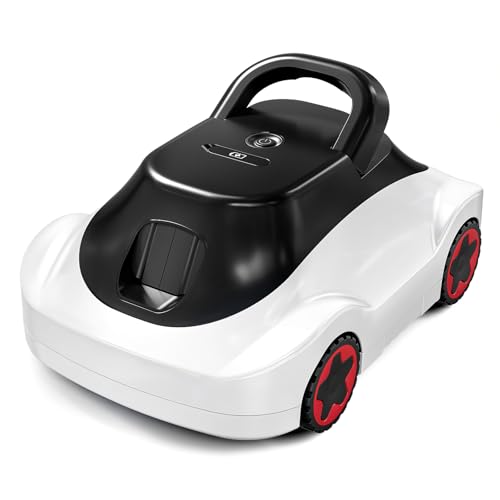
![[2026 NEW] C1 Robotic Pool Cleaner with 180Mins, Deep Gray](https://m.media-amazon.com/images/I/41dtMJtlXbL._SL500_.jpg "[2026 NEW] C1 Robotic Pool Cleaner with 180Mins, Deep Gray")

Unpack and Inspect All Components
Remove every part from the box and lay them out so you can verify nothing arrived damaged. Check for cracks in the filter basket, tears in any hoses, and ensure all cable connectors are intact and free of debris.
If your model uses a separate power supply or transformer, examine the cord for cuts or exposed wiring. A damaged power cable creates a safety hazard and should be replaced before the unit touches water.
Fill the Filter Basket Before First Use
Most robotic cleaners have a filter basket that must be filled with water before operation. This primes the system and helps the motor run smoothly from the start.
Open the filter basket compartment, add water until it reaches the fill line marked on the basket, then close it securely. Skipping this step can cause the motor to run dry and overheat during the first cycle.
Assemble Any Detachable Parts
Some models ship with separate brush cartridges, side brushes, or filter cartridges that must be attached before use. Consult your manual to identify which parts attach where and in what order.
Push or twist components firmly into their sockets until you hear or feel a click. Loose attachments can detach underwater and reduce cleaning effectiveness.
Connect the Power Supply Safely
If your cleaner uses a corded power supply, plug the transformer into a grounded outlet before connecting the cable to the unit. Never submerge the power supply or transformer itself, and always keep it on dry ground away from the pool edge.
For cordless or battery-operated models, charge the battery fully according to the manufacturer’s time recommendation before first use. A partially charged battery may not complete a full cleaning cycle.
Position the Cleaner at the Correct Depth
Place your cleaner on the pool floor at the depth your manual specifies. Most units work best on the bottom of the pool, but some are designed to float or operate at mid-depth.
If the cleaner floats to the surface or sinks unevenly, it may not have enough water in its filter basket or a weight may be missing. Check the manual to confirm your pool depth is within the unit’s operating range.
Run the First Cycle and Monitor
Start the cleaner and watch it for the first 10-15 minutes to confirm it moves smoothly and doesn’t get stuck on obstacles. Listen for unusual grinding or squealing sounds, which may indicate a misaligned brush or debris in the motor.
Stay nearby during the first run so you can stop the unit immediately if something goes wrong. This short observation period often catches setup mistakes before they cause damage.
Clean the Filter After Each Use
Once the cleaning cycle finishes, remove the unit from the pool and open the filter basket. Empty out leaves, debris, and dirt that accumulated during the run.
Rinse the filter basket with fresh water and let it dry before the next use. A clogged filter forces the motor to work harder and shortens the cleaner’s lifespan.
How to Fix Common Setup Issues
- Cleaner won’t power on: verify the outlet works, check that the power cable is fully connected, and confirm the battery is charged if applicable.
- Unit sinks unevenly or floats: refill the filter basket to the marked line and check that all weight attachments are in place.
- Cleaner gets stuck in corners: remove large debris from the pool floor and confirm the unit’s movement pattern matches your pool layout.
- Motor sounds grinding or squeals: stop the unit immediately, remove any tangled hair or cord, and inspect brushes for damage.
- Filter basket fills too quickly: clean the pool skimmer and pre-filter before running the cleaner to reduce debris load.
Frequently Asked Questions
Do I need to drain my pool before setting up a robotic cleaner?
No. Robotic cleaners are designed to operate in a full pool and do not require draining. Simply ensure the water level is at normal operating height, usually within 6 inches of the top of the pool wall.
How long should I let the cleaner run on its first cycle?
Most manufacturers recommend running the unit for 2-3 hours on the first cycle to allow it to map your pool and remove initial debris. Check your manual for the specific recommendation for your model.
Can I set up a robotic pool cleaner in cold water?
Operating temperature varies by model, but most robotic cleaners work best in water above 60 degrees Fahrenheit. Using the unit in very cold water can damage internal seals and reduce motor performance. Consult your manual for the minimum temperature rating.
What should I do if the cleaner leaks water during setup?
Minor weeping at seams is normal, but active leaking means a seal is not seated correctly. Remove the unit from the pool, disassemble the leaking section, dry all parts, and reassemble firmly. If leaking continues, the seal may be damaged and need replacement.
Is it normal for the cleaner to move slowly during the first run?
Yes. The unit may move cautiously as it learns your pool’s layout and encounters debris. Speed typically increases once the filter clears and the cleaner completes its first full cycle.
Related Guides
- How Often Should I Run My Robotic Pool Cleaner?
- How Long Should a Robotic Pool Cleaner Run?
- Best Robotic Pool Cleaner for 1500 Sq Ft Pool
Getting Your Cleaner Running
Setting up a robotic pool cleaner correctly takes just a few minutes and prevents problems that waste time later. Follow your manual’s steps in order, fill the filter basket, connect power safely, and monitor the first cycle to catch any issues right away.


