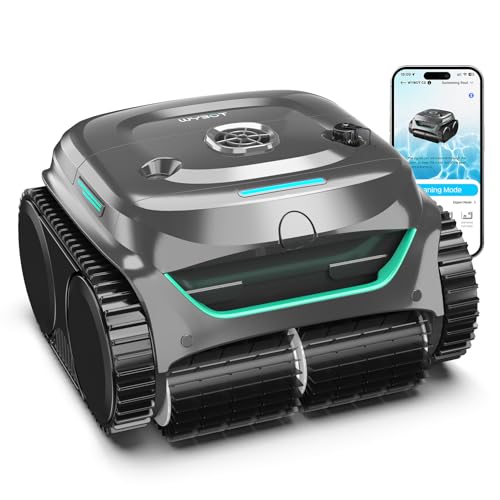
To clean heavy debris with a robotic pool cleaner, you need to optimize the robot’s settings, clear the filter frequently, and sometimes pre-skim large debris. Heavy debris like leaves, twigs, and acorns can clog filters and jam brushes, reducing cleaning efficiency. Understanding how your robot works and adapting your approach will help it tackle even the messiest pools.


Why Heavy Debris Is Challenging for Robotic Pool Cleaners
Robotic pool cleaners are designed to handle fine dirt and small particles, but heavy debris presents unique challenges. Large leaves can block the intake, twigs can get stuck in the brushes, and acorns may jam the impeller. The robot’s filter basket can fill up quickly, reducing suction and causing the robot to stop prematurely.
Additionally, heavy debris tends to settle in corners and along the pool floor, areas that require strong suction and precise navigation. Without proper setup, your robot may spend more time struggling than actually cleaning.
Pre-Cleaning the Pool Before Using the Robot
Before you send your robotic pool cleaner on a heavy debris mission, it helps to remove the largest objects manually. Use a skimmer net to scoop out floating leaves, large twigs, and any debris that could clog the robot’s filter immediately. This step prevents the robot from wasting battery power on oversized items that it can’t process efficiently.
Pre-skimming also reduces the risk of the robot getting stuck or damaged. Even the best robotic cleaners have limits on the size of debris they can handle. A quick net pass saves time and improves overall cleaning results.
Adjusting the Robot’s Cycle and Settings for Heavy Debris
Many robotic pool cleaners offer programmable cycles or modes. For heavy debris, select a longer cleaning cycle that gives the robot more time to cover the entire pool. Some models have a “heavy debris” or “intensive” mode that increases suction power and slows down movement to ensure thorough cleaning.
If your robot allows you to schedule multiple cycles, consider running it twice in a row. The first pass collects the bulk of the debris, and the second pass picks up anything left behind. This approach is especially useful after a storm or when leaves are falling heavily.
Choosing the Right Filter and Maintaining It
The filter type significantly affects how well your robotic pool cleaner handles heavy debris. Fine mesh filters are great for capturing small particles but can clog quickly with leaves. For heavy debris, a coarse filter basket or a leaf bag attachment (if available) allows larger debris to be collected without blocking water flow.
Regardless of the filter, you must clean it frequently during heavy debris cleaning. Check the filter after each cycle, and remove accumulated debris to maintain suction. If your robot’s filter is full, the robot will lose performance and may stop cleaning altogether.
Maintaining Brushes and Tracks for Optimal Performance
Heavy debris can put extra strain on your robot’s brushes and tracks. Leaves and twigs can wrap around brushes, reducing their effectiveness. Inspect the brushes after each use and remove any tangled debris. Similarly, check the tracks or wheels for debris that could impede movement.
Keeping the brushes clean ensures they can agitate and lift debris off the pool floor. Worn brushes should be replaced promptly to maintain cleaning performance, especially when dealing with heavy debris.
How to Fix: Actionable Steps for Heavy Debris
- Skim the pool surface and remove large debris manually before starting the robot.
- Select a longer cleaning cycle or a heavy debris mode if available.
- Use a coarse filter basket or leaf bag attachment to prevent clogging.
- Empty the filter after each cycle and check for clogs in the impeller.
- Inspect and clean the brushes and tracks after each use.
- Run the robot for a second cycle if heavy debris remains.
For a deeper understanding of how your robotic pool cleaner moves through the water to cover every inch of the pool, read our article on how robotic pool cleaners move underwater. Understanding the mechanics can help you position the robot and choose the right settings for heavy debris.
Frequently Asked Questions
Can a robotic pool cleaner handle large leaves?
Most robotic pool cleaners can handle leaves up to a few inches in size, but large leaves may clog the intake. Pre-skimming and using a coarse filter improve performance. Some models are specifically designed for larger debris.
How often should I empty the filter when cleaning heavy debris?
You should empty the filter after every cleaning cycle, and sometimes during the cycle if the robot stops. A full filter reduces suction and can cause the robot to stop working. Check it frequently.
Should I skim the pool before using the robot?
Yes, skimming the pool before using the robot removes large floating debris that could clog the robot. This simple step saves time and improves cleaning efficiency, especially with heavy debris.
What if the robot gets stuck on heavy debris?
If your robot gets stuck, remove the debris manually and check for any tangled items. Ensure the robot’s tracks or wheels are clear. If it frequently gets stuck, consider adjusting the cleaning cycle or pre-cleaning the pool more thoroughly.
Does the robot’s brush type matter for heavy debris?
Yes, brush type matters. Some robots have dual brushes that are more effective at lifting heavy debris. If your robot has interchangeable brushes, opt for a model with stiffer bristles for heavy debris.
Related Guides
- Best Robot Pool Cleaner Brand
- How Do Robotic Pool Cleaners Map a Pool
- Can Robotic Pool Cleaners Pick Up Acorns
Closing
Cleaning heavy debris with a robotic pool cleaner requires a combination of pre-cleaning, adjusting settings, and maintaining your robot. By following the steps above, you can keep your pool clean even after a big storm. For more on how robots navigate to cover every corner, check out our guide on how robotic pool cleaners move underwater.